Astra + Blender: A Reproducible Architectural Workflow Test
Everything on this page can be run. It ships the scene, the two scripts that build and verify it, the exact commands, and the two renders that came out of a real run — all of it free to download, so you can reproduce the figures below on your own machine with nothing but Blender.
The subject is a small courtyard pavilion, and the whole test is one variable: the number of columns along its open front.
How this was made. The pavilion is our own fixture — we designed the scene and wrote the two Python scripts that build and check it. Astra ran those scripts in background Blender, read the JSON reports, viewed the renders, and regenerated the scene with a different column count. It did not design the building from a blank prompt, and it did not edit meshes by hand.
Everything below comes from one run on 5 September 2026: Astra (requested model gpt-6-astra) in Codex CLI 0.153.2, driving Blender 5.1.0 (build adfe2921d5f3) on macOS, in separate --background --factory-startup processes.
Running Blender Through bpy Is Not the Same as MCP
OpenAI published an article on 4 September 2026 about architectural visualization with Astra in Codex. The path it describes is the one tested here: the agent writes Python against Blender’s bpy API, runs Blender headless on that script, and then looks at what came out — reports and rendered images. An MCP server is not part of that path. You can read it at learn.chatgpt.com . Its house, prompts, and images are its own; the pavilion below is unrelated original work.
The two approaches solve different problems:
- Background
bpyexecution — a fresh, headless Blender process runs a script and writes files. Repeatable, scriptable, and safe to run while you work, because it never touches your open session. It also cannot see what you are looking at. - Blender MCP — your AI client gets tools that inspect and modify the scene already open in Blender. Interactive and context-aware, at the cost of a running server, an addon, and a live session. The setup guides cover that path.
Neither replaces the other. This guide tests the first one, because it is the one you can hand to someone else and expect the same result.
The Test Scene: a Courtyard Pavilion
A raised plinth, three solid walls, an open colonnade along the long front, and a flat roof slab. No textures, no imported assets, no HDRI — only boxes, three grey materials, one sun, and one camera. It was chosen to be readable at a glance and quick to render, not to be a building: nothing here is engineered, and it is not construction guidance.
The scripts leave Blender’s unit system at its default, so every figure below is a raw Blender unit. Read one unit as one metre to picture the scale — that reading is a convention of this guide, not something the file declares.
| Element | Object | Size (Blender units) | Notes |
|---|---|---|---|
| Plinth | PAV_Plinth | 9.00 × 6.00 × 0.30 | The base everything stands on |
| Back wall | PAV_Wall_Back | 8.00 × 0.20 × 3.02 | Closes the long rear side |
| Side walls | PAV_Wall_Side_L, PAV_Wall_Side_R | 0.20 × 5.10 × 3.02 | One per short side |
| Columns | PAV_Column_01… | 0.24 × 0.24 × 3.02 each | Evenly spaced along the open front |
| Roof slab | PAV_Roof_Slab | 9.60 × 6.60 × 0.24 | Projects 0.30 units beyond the plinth on all four sides |
| Ground | SITE_Ground | 40 × 40 plane | Sits 0.02 units below the plinth |
A few details that make the fixture behave:
- Column layout. Column centres always run from x = -4.08 to x = +4.08, so the spacing is simply 8.16 divided by one less than the column count. Changing the count changes the rhythm, never the width of the building.
- Intentional overlaps at the joints. Walls and columns span z = 0.29 to z = 3.31, so they sink 0.01 units into the plinth top and 0.01 units into the roof underside rather than stopping flush against them.
- Materials and light. Three Principled materials (
MAT_Concrete_Plinth,MAT_Concrete_Structure,MAT_Ground), one sun at strength 3.0, and a flat grey world background. CameraCAM_Herois a 35 mm lens on a 36 mm sensor at (12, -11, 4.6), aimed at (0, 0, 1.6). - Fixed render settings. Cycles on CPU, 96 samples, adaptive threshold 0.02, OpenImageDenoise, AgX view transform, 1280 × 800 PNG. None of these are exposed as flags, so everyone runs the same render configuration. Pixel-identical output across different machines, hardware, and Blender builds was not tested.
Run It Yourself
Downloads, free and with no signup:
build_pavilion.py— builds, renders, and saves the scenecheck_pavilion.py— independently validates a saved.blendpavilion-columns-06.blendandpavilion-columns-11.blend— the two scenes from the runmanifest.jsonandLICENSE.md
The .blend files are the shortcut. The scripts are the point: they rebuild both scenes from source.
The commands call blender. Use whatever your install provides — on macOS the executable lives inside the app bundle at /Applications/Blender.app/Contents/MacOS/Blender. This run was on Blender 5.1.0 on macOS only; other versions and platforms are not claimed to behave identically.
Build the six-column pavilion
Run this from the directory where you saved the scripts. Everything after the bare -- is passed to the script rather than to Blender.
blender --background --factory-startup \
  --python build_pavilion.py -- \
  --columns 6 --out ~/pavilion-runs/columns-06 --render --save-blend
It writes pavilion.blend, render.png, and scene_report.json into that new directory.
Validate what it produced
A second Blender process opens the saved file with autoexec disabled and re-derives every measurement from the file itself.
blender --background --factory-startup --disable-autoexec \
  --python check_pavilion.py -- \
  --blend ~/pavilion-runs/columns-06/pavilion.blend \
  --expect-columns 6 \
  --expect-render ~/pavilion-runs/columns-06/render.png \
  --report ~/pavilion-runs/columns-06/validation.json
Regenerate the variant
Same script, one different argument, a new directory. The six-column run stays exactly as it was.
blender --background --factory-startup \
  --python build_pavilion.py -- \
  --columns 11 --out ~/pavilion-runs/columns-11 --render --save-blend
Validate the variant
blender --background --factory-startup --disable-autoexec \
  --python check_pavilion.py -- \
  --blend ~/pavilion-runs/columns-11/pavilion.blend \
  --expect-columns 11 \
  --expect-render ~/pavilion-runs/columns-11/render.png \
  --report ~/pavilion-runs/columns-11/validation.json
What the scripts will and will not do:
- Flags. The builder takes
--columns(3 to 16),--out,--render, and--save-blend. The checker takes--blend,--expect-columns,--expect-render, and--report. Quality settings are fixed on purpose, so the column count is the only variable. - Exit codes.
0success,1a validation failure,2the output or report path already exists,3a bad argument. Re-running a command with the same paths fails at2instead of overwriting anything. - No cleanup, ever. Neither script deletes or overwrites files, and the builder refuses to run outside background mode or on anything other than an untouched factory-startup scene — so it cannot disturb a project you have open.
- No dependencies. No internet, no MCP server, no credentials, no Python packages beyond the interpreter bundled with Blender.
Before and After: Six Columns, Then Eleven
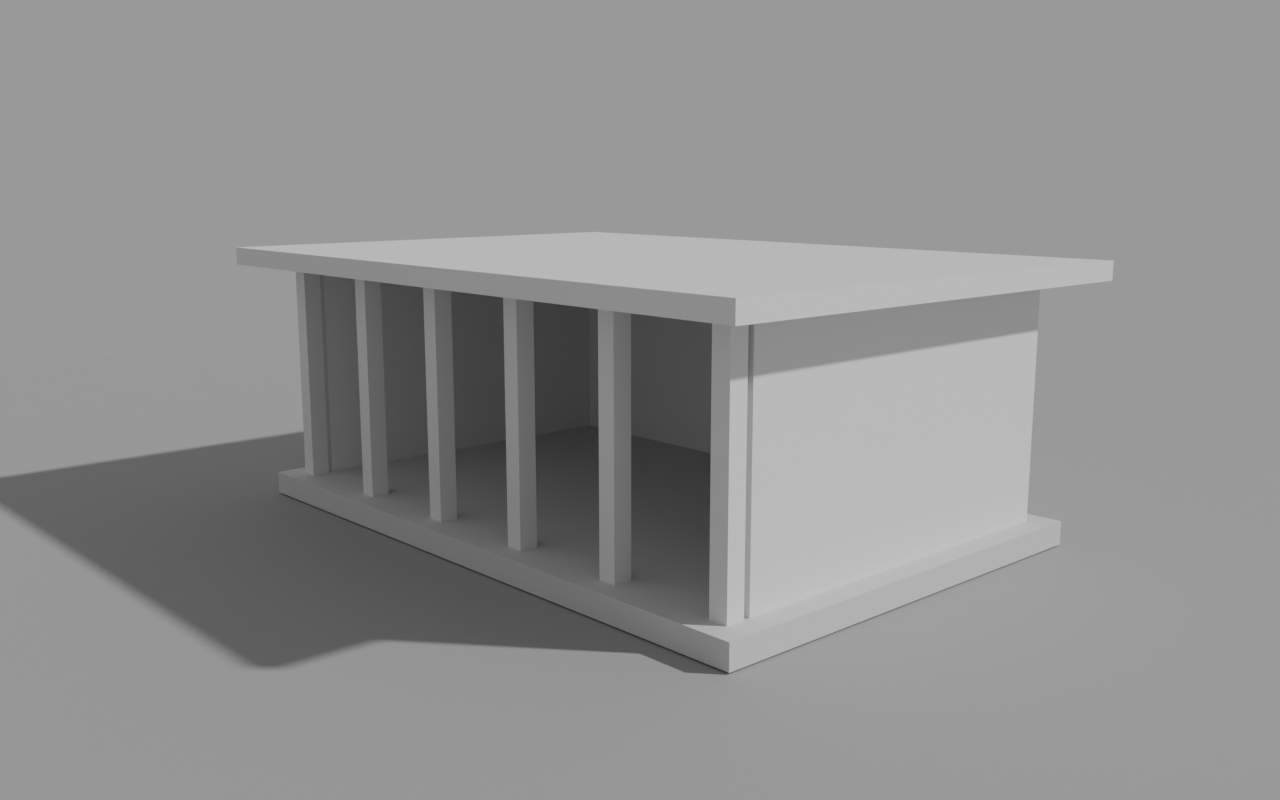
Six columns, 1.632 units apart on centre. 134 triangles.
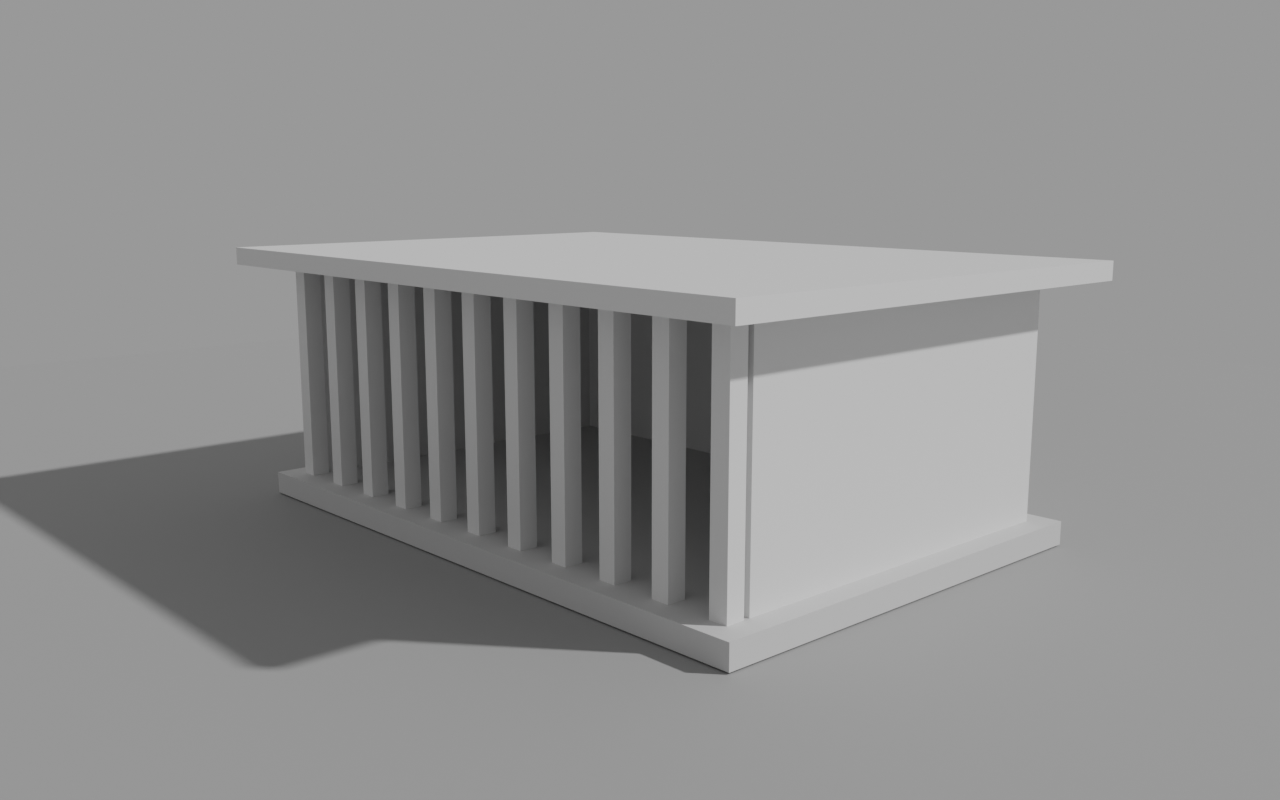
Eleven columns, 0.816 units apart on centre. 194 triangles.
Between the two images, one argument changed. Centre spacing halves from 1.632 to 0.816 units, and because the columns keep their 0.24-unit section, the clear gap between neighbours narrows from 1.392 to 0.576 units — the facade reads as a screen rather than a row of openings. The plinth, walls, roof, materials, sun, camera, and render settings are identical.
Two things worth being precise about. The second scene was regenerated from the same script into its own directory, not edited in place — afterwards the first run’s files still hashed exactly as they had before, so nothing was quietly modified. And the denser colonnade is not the better design; it is a different rhythm. What the test shows is that the change is reproducible and inspectable, not that an agent improved the building.
Validating the Result
The checker never trusts the builder. It opens the saved .blend in a separate Blender process and re-measures everything from the file:
- scene and collection structure, and how many objects sit in each
- every object’s world-space bounds, dimensions, rotation, and scale
- column names, ordering, and the exact centre spacing for the expected count
- the contact planes where columns and walls meet the plinth and the roof
- material slots limited to the three pavilion materials, with no image or environment texture node reachable from the scene
- zero modifiers anywhere, and an exact triangle total
- camera lens, sensor, position and aim; a single sun
- the factory startup scene still present and untouched
- the rendered PNG’s dimensions and its luminance variance, so a blank frame cannot pass
Both variants passed this independent validation with zero reported failures. The exact bundle that was tested is recorded in the downloadable manifest.json, so the evidence travels with the files instead of ageing inside this paragraph. It was one run on one machine, not a benchmark.
These checks confirm the properties they measure — the structure, geometry, materials, camera, and rendered output specified for this fixture. They are not a certification of everything else in the file, not a judgement of how the result looks, and not a statement about how any model performs in general.
Prompts That Match the Task
The instructions given to Astra were longer and full of local paths. These are condensed, reusable versions of the same three requests — note that each one asks for execution and verification, not design.
Using Blender 5.1 in background mode with factory startup, run build_pavilion.py
with --columns 6 into a new output directory, rendering and saving the .blend.
Then run check_pavilion.py against that .blend with --expect-columns 6 and a new
report path. Report the exit codes. Do not edit the scripts, retry silently, or
reuse an existing directory.
Read scene_report.json and validation.json from that directory, and view
render.png if you have an image tool. Report only what you actually observed:
column count, centre spacing, triangle count, how many checks ran, and any
failures.Run build_pavilion.py again with --columns 11 into a second new directory, then
validate it with --expect-columns 11. Leave the first directory untouched, and
tell me what differs between the two.What We Measured, and Where It Broke
- Blender did not start under a restricted sandbox. Under restricted read-only and workspace-write Codex sandboxes, Blender crashed during macOS Metal startup — before a single line of Python ran. The run that completed used the standard full-access local CLI mode. That is what happened on this machine; it says nothing about the model, and your setup may behave differently. Do not read it as “turn your protections off” either: approve only the specific local script and file actions you actually trust, in an environment you control.
- Deprecation warnings appear on stderr. Blender 5.1 logs
'Material.use_nodes' is expected to be removed in Blender 6.0, and theWorldequivalent. They did not fail this verified run. Blender versions other than 5.1.0 were not tested here, so treat behaviour on them as unknown. - Refusals are a feature. Both scripts exit
2rather than overwrite an existing output or report path, so a repeated command fails until you choose a new one. That is what keeps a variant run from destroying the original. - Offline scripts, online agent. The Blender side needs no network, MCP server, credentials, or extra packages. The agent session itself is online, and what it is allowed to run depends entirely on your client’s approval settings.
- One run, one machine. Model and tool availability are specific to that session. Nothing here is a promise about other models, plans, platforms, or Blender versions.
Licensing and Reuse
The two scripts are MIT. The two .blend files and both renders on this page are released under CC0-1.0 — use them commercially, in tutorials, or as a starting point, with no attribution required. Full terms are in LICENSE.md.
All of it is original work: the fixture bundles no third-party models, textures, or HDRIs. Nothing here relicenses anything else — Blender keeps its own license, and the upstream blender-mcp project by Siddharth Ahuja and contributors keeps its own.
Disclosure: the team that maintains this site also builds 3D-Agent, a paid Blender AI app. Nothing above depends on it — the scripts, both scenes, and both renders are free to download and re-run with Blender alone. If you would rather not assemble and maintain an AI stack between projects, its Blender architecture and archviz workflow is where that path starts. It is a different product doing different work, not a managed version of the test on this page.
FAQ
Does this workflow need Blender MCP?
No. The scripts run inside a headless background Blender process, so nothing connects to a live session. Blender MCP is the other path: it gives an AI client tools to inspect and modify the scene you already have open. The two are useful for different jobs.
Do the scripts need internet access, an API key, or extra Python packages?
No. They use only the Python interpreter bundled with Blender, and they make no network calls. The AI session driving them is of course online, and what it may run depends on your client's approval settings.
Can I build the eleven-column variant without redoing the first one?
Yes, by giving each build its own new output directory. The builder exits with code 2 rather than write into an output directory that already exists, and the checker exits the same way rather than write over an existing report file. The builder takes no .blend input at all, so it only ever writes; the checker reads the .blend and render you point it at. Keeping the two runs in separate directories is what leaves the first one as it was. You can also download either saved .blend file directly.
Is the pavilion a real architectural design?
No. It is a demonstration fixture, chosen to be easy to read and fast to render on a CPU. It is not structurally engineered and is not construction guidance.
Next Steps
- Architectural visualization with Blender MCP — the same subject through the MCP path, with prompts for massing, interiors, and lighting
- Setup guides — connect Claude, Cursor, VS Code, ChatGPT, Gemini, or a local Ollama model to Blender
- Server architecture — what the MCP server exposes, tool by tool
- Gallery — more example scenes and the prompts behind them